Case study Audio · Pro tools · Designed 2022 · Read 2026

ELIAS 4: designing a middleware that composers can actually use.

Owning end-to-end product design for a node-based adaptive audio engine: how ELIAS 4 positions against Wwise and FMOD, how the Studio's interface is architected, and the design bets behind every screen.

RoleSenior Product Designer, contract, end-to-end
CompanyElias Software
TimelineDesigned 2022 · retrospective 2026
PlatformDesktop authoring + C/C++ runtime
No soundbanksIteration loop drops from minutes to seconds
One canvasSignal flow, logic, parameters and DSP in one graph
Live remotingEdits land in a running game session instantly
Python designtimeStudios script their own tools against live data
In 30 seconds
  • Four workflow bets against Wwise and FMOD: no soundbanks, one node canvas, live remoting, Python designtime. None of them is an audio feature.
  • One mental model everywhere: four content types, a fractal graph, and DAW conventions spent exactly where familiarity buys the most.
  • Outcomes: the design work anchored a successful funding round and the design function scaled from one designer to five.
ELIAS Studio patch editor with audio, logic and DSP nodes on one canvas
FIG. 01 Patch view. Audio sources, logic nodes and DSP connect on a single canvas. Wires read left to right in signal-flow convention; typed ports make legal connections visually predictable.
01 · Context

A category owned by two incumbents, and their shared weakness.

Role note. I designed ELIAS 4 end to end in 2022: IA, core flows, the node editor, and the design system. This case study pairs that work with a retrospective read of the shipped product as it stands in 2026, competitors included.

Game audio middleware is a category dominated by two incumbents, Audiokinetic's Wwise and Firelight's FMOD, with Epic's MetaSounds emerging inside Unreal. Both incumbents are powerful and both carry decades of accumulated interface complexity: soundbank pipelines, rebuild cycles and steep learning curves that skew the tools toward audio programmers rather than the composers and sound designers who author the actual content.

ELIAS started life as a pure adaptive music engine and expanded after 2018 into a fully spatialized sound engine. ELIAS 4 is the product of that expansion: a complete middleware that keeps the adaptive-music DNA as its differentiator. The product's pitch is telling. It doesn't lead with feature count, it leads with "create more with less effort and less overhead." That's a UX claim, not a technology claim, and it defined my brief: the entire competitive strategy rests on interface and workflow quality.

The core UX thesis

The incumbents' weakness isn't capability, it's friction. Every major feature decision (no soundbanks, visual scripting, live editing, Python tooling) attacks a specific incumbent friction point.

02 · Users & jobs

Made for composers and sound designers, with a real path for programmers.

We aimed the Studio squarely at composers and sound designers, and deliberately de-coupled authoring from programming skill. Programmers get a parallel path through APIs, wrappers and optional source access.

Composers

Job

Author adaptive soundtracks with per-instrument rules, motifs, tonal stingers and musical transitions, without touching code or waiting on engineering for iteration.

Friction today

Traditional middleware asks them to think in trigger logic and bank pipelines before they can hear a single musical decision play back in context.

"Close the loop between changing a sound and hearing it in the game."

Sound designers

Job

Build spatialized soundscapes, parameter-driven logic and DSP chains through the node graph; test directly in the tool and live-tweak against a running game.

Friction today

Audio logic buried in code or opaque event hierarchies makes behavior hard to read back, and impossible to hand to a non-programmer.

"I can build anything in here. I just need to see what I built."

Personas reflect the two authoring roles the product was built for, drawn from studio partners and community feedback during development. Quotes are illustrative voice.

Audio programmers are the third user: they integrate the C/C++ runtime with any engine (Unity and Godot ship out of the box), automate the designtime via Python, and customize a modular codebase. The shared job across all three is the same, and it is the slowest, most demoralizing loop in traditional middleware workflows: hear the change in context.

03 · UX strategy

Four bets, each aimed at a known pain.

01

No soundbanks

Attacks bank build and rebuild cycles that break flow every time content changes. The iteration loop collapses from minutes to seconds, and "fast workflow without soundbanks" is the headline feature, not a footnote.

02

Visual scripting

Attacks audio logic buried in code or opaque event hierarchies. Signal flow, logic, parameters and DSP live on one sample-perfect node canvas that non-programmers can read and author.

03

Live editing and remoting

Attacks the edit, export, build, launch, listen cycle. You connect to a running game session and swap files, mix and tweak with instant in-game updates.

04

Python designtime

Attacks closed black-box tooling that teams can't extend. Studios script their own tools and batch workflows against live project data, so the tool becomes a platform.

Notice what these four bets have in common: none of them is an audio feature per se. All four are workflow features. Spatialization, DSP and platform coverage are treated as table stakes; the differentiation budget is spent entirely on reducing time-to-feedback and lowering the skill floor.

04 · Studio architecture

A four-zone layout every DAW and IDE user already knows.

Across every screen, the Studio holds a consistent four-zone layout, a structure any DAW or IDE user will recognize instantly, which is precisely the point.

L

Left rail, project browser

Persistent tree grouping Patches, Music, Mixers and Assets, the four content types of the entire mental model. Everything you author lives in one of these buckets.

C

Center, tabbed canvas

Document tabs hold patch graphs, arrangements and profiler views side by side. The graph canvas and the timeline share the same real estate, unifying sound logic and music as peer document types.

R

Right rail, properties

Contextual inspector for the current selection: node parameters, asset settings, transition rules. Selection-driven, so the canvas stays uncluttered.

B

Bottom, transport and status

Play and stop transport, meters and session state: the constant "can I hear it right now?" affordance that backs the fast-iteration promise.

The visual language is a restrained pro-audio dark theme with the brand magenta reserved for identity moments and selection accents, while functional color is spent on the type system of the graph: ports and wires are color-coded by signal type (audio, parameters, events, triggers). Color has a job here, it isn't decoration.

05 · Screen analysis

Five surfaces, and the design bet inside each.

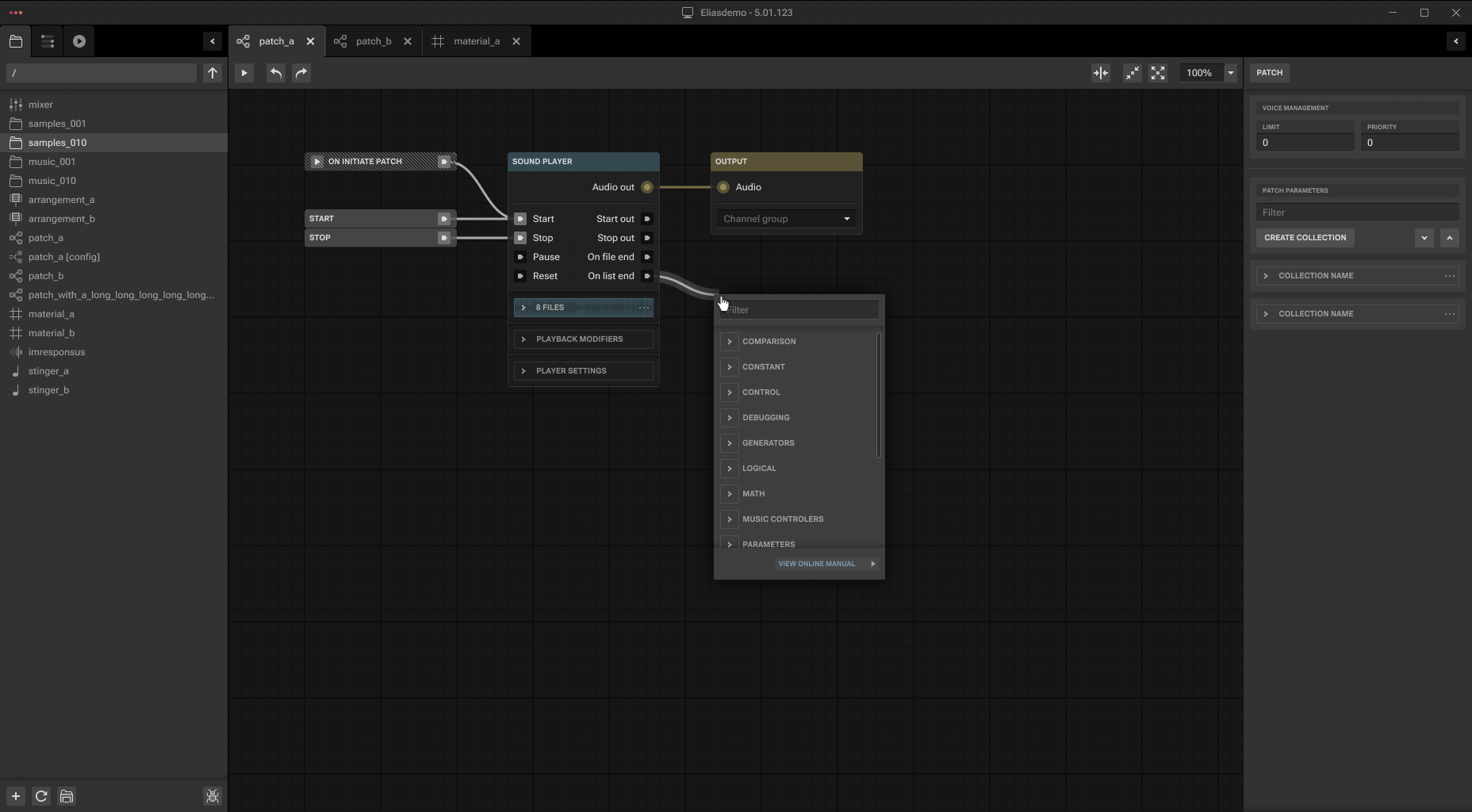
The patch editor, the product's center of gravity

A denser ELIAS Studio patch graph with many nodes and wires
FIG. 02 A denser patch. The screen that reveals how the design scales when real projects get complicated, and why subgraphs exist.
Strength

Familiarity as an onboarding strategy. I borrowed conventions from Blender nodes, Max/MSP and Unreal Blueprints deliberately. A target user has almost certainly used one of these, so the learning curve starts halfway up.

Typed, color-coded ports encode the data model in the UI itself. Users learn what connects to what by sight, cutting a whole class of trial-and-error errors.

Test-in-tool transport means the author never leaves the canvas to validate a change.

Friction risk

Node graphs punish scale. The dense patch already shows wire crossings. Without strong auto-layout, alignment tools and wire organization, large projects can decay into spaghetti, the classic failure mode of visual scripting.

Open question

Graph search was still open design debt when I left. At hundreds of nodes, find, jump and minimap become as important as the editing itself.

Subgraphs, progressive disclosure for logic

Collapsed subgraph node with exposed ports
FIG. 03 Subgraph as a node. Complexity folds into a single unit with clean exposed ports.
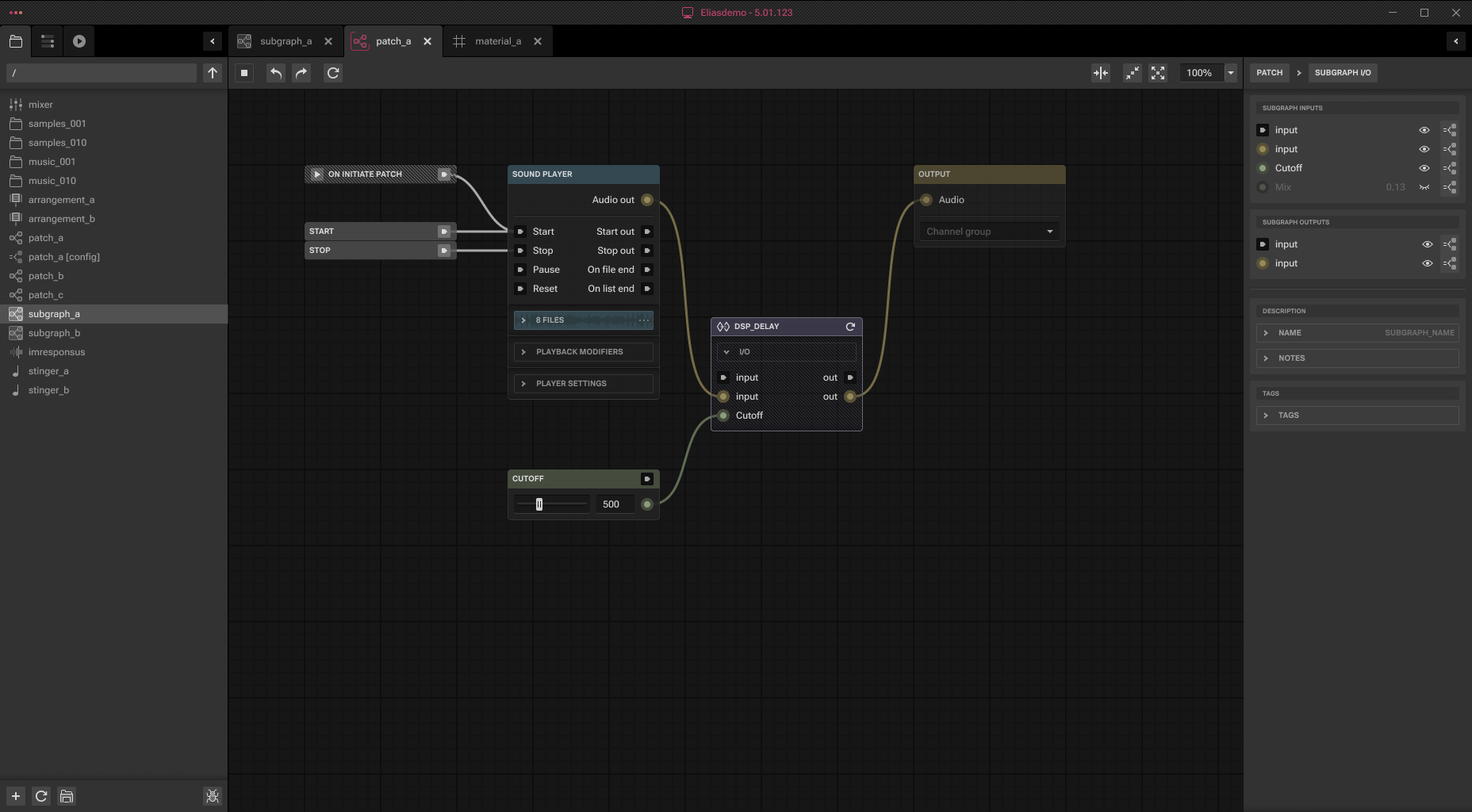
Inside an ELIAS Studio subgraph
FIG. 04 Inside the subgraph. The internal network stays editable; the boundary defines the contract.
Strength

Encapsulation answers the spaghetti risk, and it doubles as a sharing primitive. Teams can build internal libraries of proven behaviors.

Same canvas, one level deeper. Entering a subgraph doesn't switch paradigms; the interaction model is fractal, which keeps the concept count low.

Open question

Breadcrumbs and depth orientation matter once subgraphs nest. How the Studio tells you where you are three levels deep is a make-or-break detail.

Configurations, one patch, many behaviors

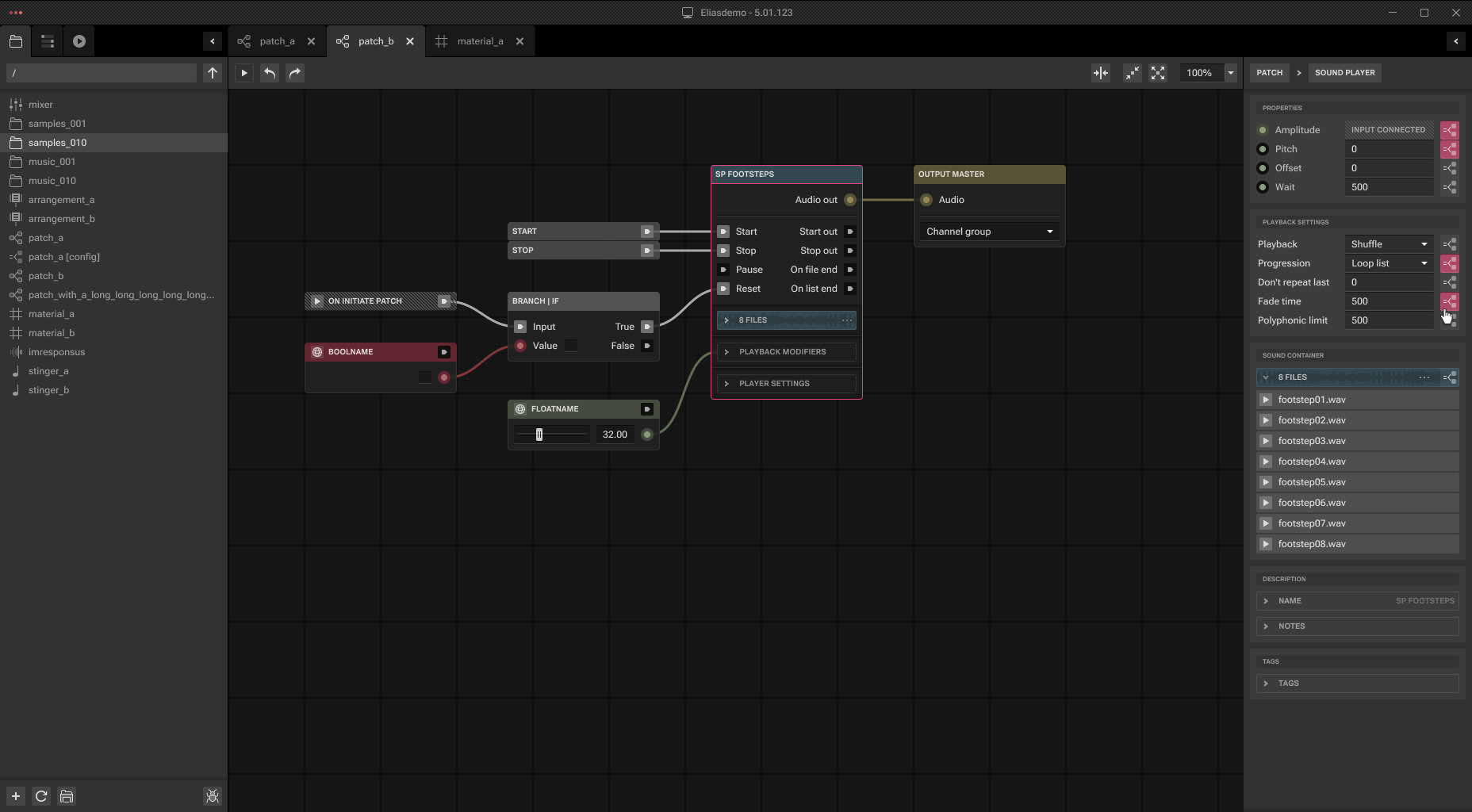
Patch configuration A in ELIAS Studio
FIG. 05 Configuration A. The same graph carrying one parameter profile.
Patch configuration B in ELIAS Studio
FIG. 06 Configuration B. Switched to another profile, without duplicating the structure.
Strength

Variants without duplication. Configurations kill the copy-the-patch-and-change-three-values anti-pattern that silently forks logic and creates maintenance debt.

Open question

Divergence visibility. When two configurations of one patch behave differently, users need a fast answer to what exactly differs. A diff-style view between configurations would close that gap.

The arrangement view, where the music DNA lives

ELIAS Studio arrangement view with instrument tracks and segments
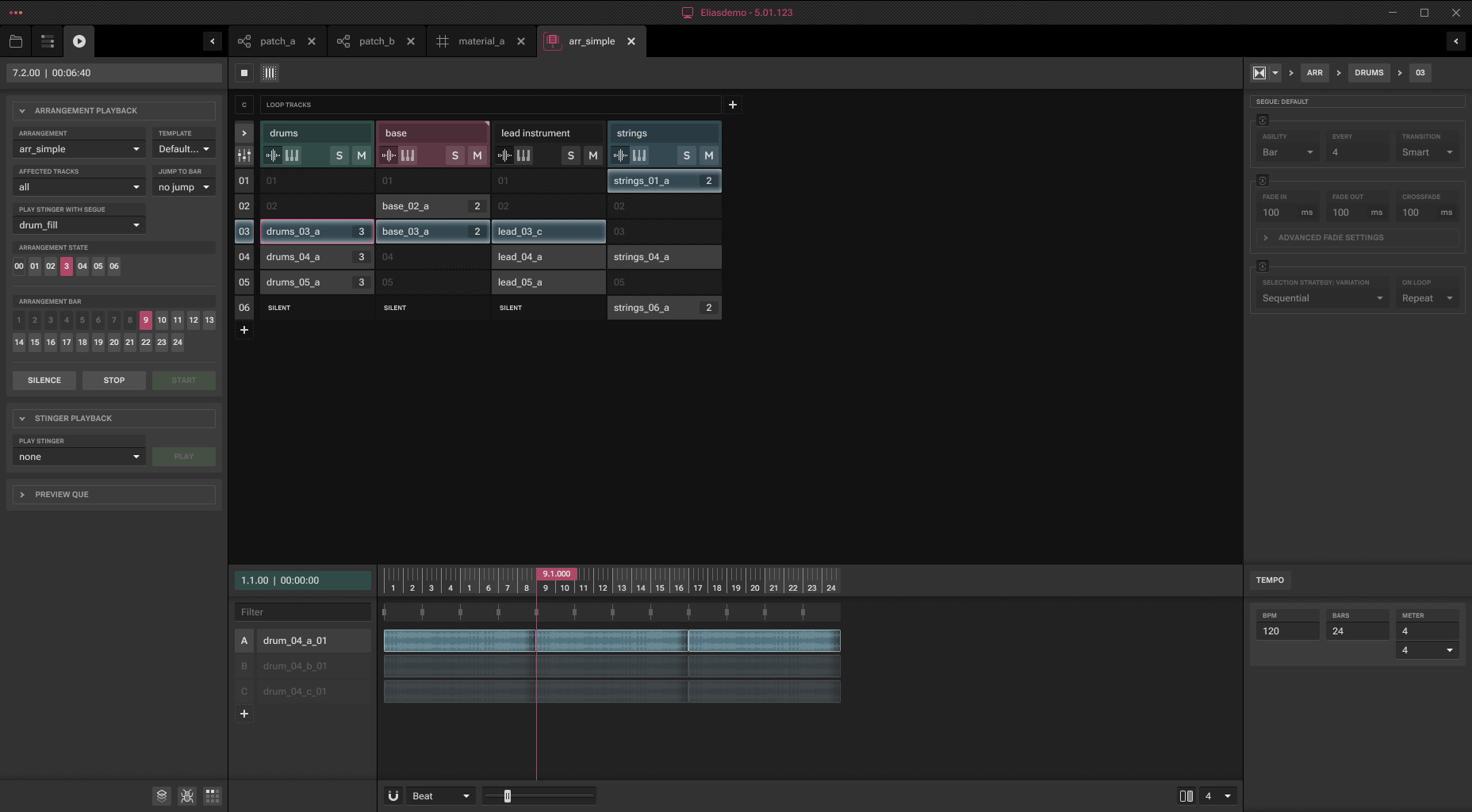
FIG. 07 Arrangement view. A timeline of instrument tracks and segments, deliberately DAW-shaped, because that's the tool composers already live in.
Strength

Adaptivity as first-class structure. Random segment selection, motifs and stingers are authored objects on the timeline, not code hidden behind the music.

Friction risk

The two-paradigm seam. Music flows can also be controlled from visual scripting. The handoff between timeline-thinking and graph-thinking is where composers are most likely to get lost.

The profiler, trust through visibility

ELIAS Studio profiler showing runtime voices and performance
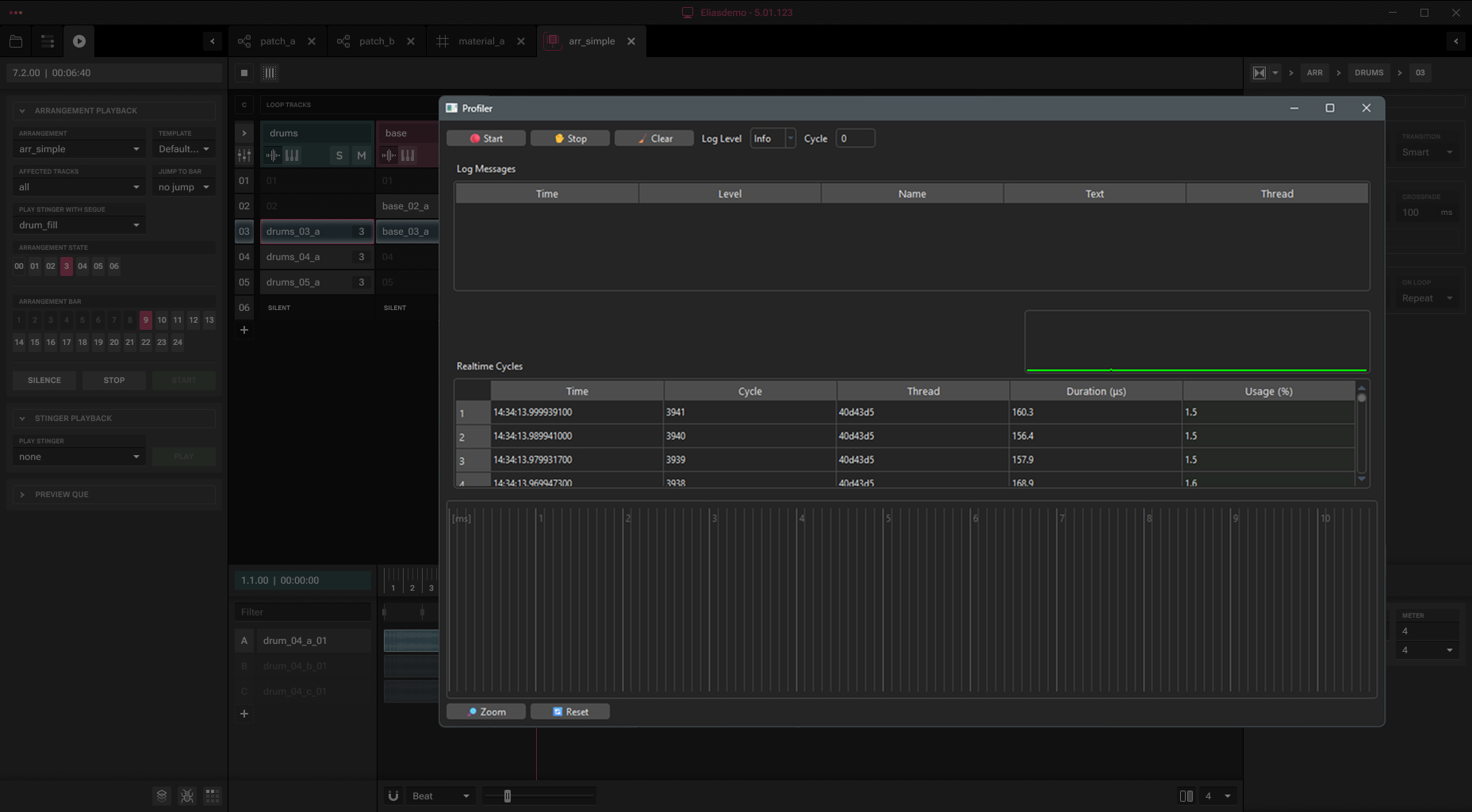
FIG. 08 Profiler. Real-time runtime introspection inside the authoring tool: voices, performance and behavior made observable.
Strength

An answer to black-box anxiety. We positioned ELIAS against opaque middleware, so the profiler had to render that claim as UI. Authors can watch culling, voice limits and performance respond to their choices.

Profiling next to authoring, not in a separate app, keeps the observe-then-adjust loop inside one window, consistent with the whole fast-iteration thesis.

06 · What holds it together

Coherence of purpose, not a feature list.

01

One mental model, everywhere

Four content types, one canvas grammar, fractal subgraphs. Concept count stays low even as capability grows: the discipline most pro tools lose over versions.

02

Feedback loop as the product

No soundbanks, in-tool playback, live remoting, embedded profiling: every layer of the product shortens the same loop.

03

Borrowed conventions, spent wisely

DAW timeline for composers, node graph for designers, IDE layout for everyone. Novelty is reserved for the genuinely new (adaptive rules, configurations); familiarity carries the rest.

04

Help as part of the interface

No pay-per-ticket support, an open Discord, an AI-powered manual, onboarding on-site or by call. For pro tools, the help experience is part of the interface, and ELIAS prices it in.

07 · Risks & opportunities

Where the bets get stress-tested.

01

Scale is the natural enemy of every node editor

The screens above show well-groomed graphs; shipping games produce ungroomed ones. Auto-layout, graph search, minimaps, wire management and strong diffing between configurations are the features that decide whether the visual-scripting bet survives contact with a 200-hour project.

02

The composer / designer seam needs a bridge

Music flows can be driven from the timeline or from the graph. That flexibility needs an opinionated default path per persona, or the flexibility reads as ambiguity.

03

Ecosystem gravity is a UX force too

Wwise and FMOD win partly on tutorials, hiring pools and plugin ecosystems. ELIAS's counters (open Discord, generous support, Python extensibility, Unity and Godot integrations out of the box) are the right shape, but the candid "we're eager to help you integrate with Unreal" signals where the adoption friction currently sits.

04

Trialability as a requirement

In this category the demo is the argument: you have to feel the workflow to believe it. Getting people into the Studio quickly matters more than any comparison table.

08 · Outcomes

What the design work unlocked.

I owned product design end-to-end: defined the information architecture and core flows, designed the node editor, and established the design system. The design work was a core asset in the successful funding round, and the design function scaled from one designer to a dedicated five-person team building on those foundations.

Funding

The designed product vision was central to securing investment for the ELIAS 4 build-out.

Team scale

Design grew from a single designer to a dedicated 5-person team working inside the system I established.

Foundations

IA, core flows, node editor interaction model and the design system shipped as the durable skeleton of the product.

Outcomes as credited during my tenure; funding specifics are the company's confidential information.

09 · Takeaways

Four principles I'd reuse anywhere.

01

Pick one loop and collapse it

ELIAS 4's entire differentiation is the time between intent and audible result. Every feature either shortens that loop or gets treated as table stakes. That focus is rare and it's why the product story is legible.

02

Spend familiarity to buy novelty

The Studio innovates in exactly two places, adaptive music structure and the configuration system, and pays for that novelty with ruthlessly conventional everything else. Users have a fixed budget for learning; spend it where you differentiate.

03

Make the data model visible

Typed ports, four content buckets, subgraph contracts: the architecture is legible in the interface. When users can see the system's shape, they debug themselves.

04

Escape hatches build trust with pros

Python scripting, source access, engine-agnostic APIs. Professional users adopt tools they know they can outgrow gracefully. Extensibility isn't a power feature, it's a trust feature.

ELIAS 4 is a case study in challenger UX: don't out-feature the incumbents, out-flow them, and make every screen prove it.

Screens © Elias Software / House of Elias.

Next case study

Aligni: right-sizing PLM and MRP