Case study Manufacturing · PLM / MRP · Designed 2021 · Read 2026

Right-sizing PLM and MRP for teams too big for spreadsheets, too small for ERP.

The design system I built inside Aligni, 50+ primitives and a documented five-phase design-to-development workflow, followed by a retrospective read of the platform it serves: how a single item master anchors the whole information architecture, and what the planning visualizations reveal about its core design bets.

RoleProduct Designer, Aligni Inc.
Timeline2021, contract
DomainPLM / MRP · Manufacturing SaaS
MethodProduct analysis + embedded design work
50+Reusable primitives with documented tokens and usage
~35%Less front-end rework after system adoption
5-phaseDocumented design-to-development workflow
1 item masterThe record the whole platform hangs off

Rework reduction is an engineering-side estimate comparing front-end rework before and after system adoption. Product observations in the later sections are a 2026 retrospective read of the shipped platform.

In 30 seconds
  • What I shipped: a 50+ primitive design system and a five-phase design-to-development workflow that cut front-end rework roughly 35%.
  • The platform's thesis: right-size PLM and MRP by making one item master visible, explainable, and one click from action.
  • Worth stealing: explainable forecasts, conversation kept on the record, and an evaluation experience designed like the product.
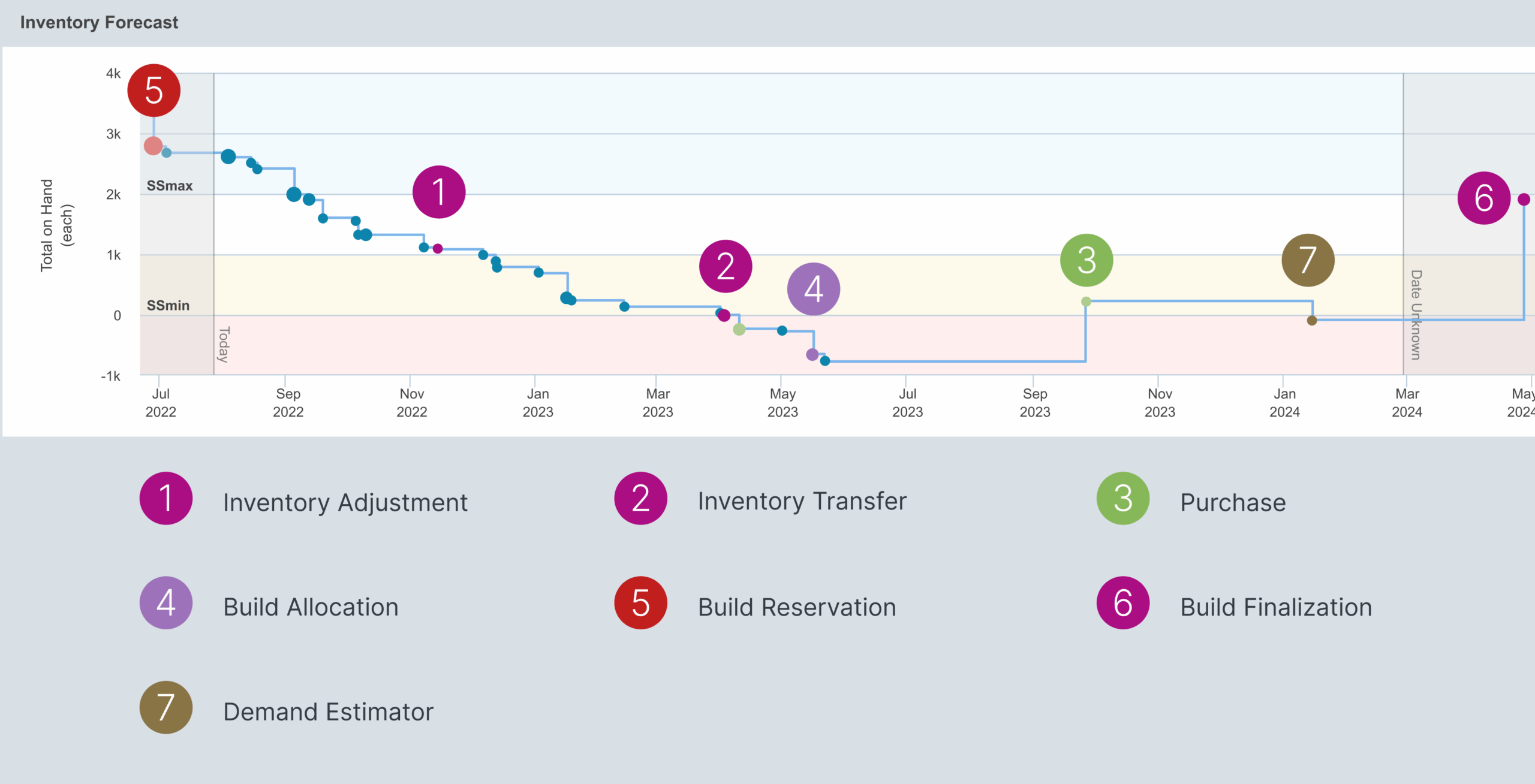
Aligni Inventory Outlook forecast chart with color-coded demand and inbound events
FIG. 01 Inventory Outlook. The signature screen: current stock, build consumption, inbound POs, demand estimates and safety stock thresholds share one timeline, and every node is hoverable for the quantity, timing and linked record behind it.
01 · My design system work

What I shipped: 50+ primitives, one documented workflow.

While embedded at Aligni I built the platform's first formal design system: 50+ reusable primitives with documented tokens, typography and usage guidelines, plus a five-phase design-to-development workflow that gave a dense, decades-deep product a shared visual and interaction language. Front-end rework dropped roughly 35% once components replaced one-off builds, per engineering estimates before and after adoption.

50+ primitives

Reusable components covering the table-heavy, form-heavy patterns the whole product is made of.

~35% less rework

Front-end rework dropped once engineering built from the system instead of per-screen specs.

5-phase workflow

A documented design-to-development pipeline that made handoff predictable for a distributed team.

02 · The domain: context & positioning

The gap between the spreadsheet and the ERP consultant.

The system above only makes sense against the product it serves, so the rest of this study reads the platform the way I would tear down a competitor. Hardware companies outgrow spreadsheets fast: BOM revisions fork, inventory counts drift, and purchasing lives in email threads. The traditional answer, enterprise ERP, brings consultants, months of implementation, and a cost structure sized for corporations. Aligni's entire positioning lives in that gap. Its argument is explicit: MRP is ERP for SMBs. Skip the mega-suite, adopt the manufacturing-focused core, and get to productivity in days.

The company has unusual depth for this niche: roughly twenty years of history, born in electronics manufacturing, which shows in the product's vocabulary (item masters, part alternates, ECOs, RFQs) and in its case-study roster of electronics and device makers. This isn't a horizontal tool wearing a manufacturing skin; the domain model came first.

Positioning is also expressed through go-to-market UX: transparent published pricing, a 30-day free trial, and a full public sandbox where prospects can explore real workflows with demo data before ever creating an account. For a considered B2B purchase, being explorable before commitment is itself a differentiating design decision.

The core UX thesis

The incumbents' weakness isn't capability, it's weight. Every product decision (one item master, visual planning, in-context discussion, transparent trialability) attacks the cost, complexity and opacity that make ERP wrong-sized for SMB manufacturers.

03 · Users & jobs

Five roles, one question: can we build it, and what's blocking us?

Aligni's navigation literally enumerates its personas: the buyer/planner, product engineer, project/production manager, inventory manager and purchasing manager. What's telling is that the product doesn't ship role-specific silos. Every role works against the same item master, and the differentiation happens in views: forecasts for planners, revisions for engineers, RFQs for buyers.

The Product Engineer

Job

Owns BOMs and revisions; needs where-used visibility, change orders with history, and documentation attached to the right revision.

Friction today

Engineering and production drift apart when structure lives in exports, and a change lands without anyone seeing what it touches.

"Source-code management for your hardware."

The Buyer / Planner

Job

Lives in the Material Shortage Report and demand estimates; needs to know what to order, when, and why, with lead times and safety stock made visible.

Friction today

Planning buried in pivot tables and tribal knowledge means every buy decision has to be re-derived in Excel before anyone trusts it.

"Tell me the drop-dead order date, not just that I'll run out."

Personas mirror the roles Aligni's own navigation enumerates, informed by working alongside those users while embedded on the team. Quotes are illustrative voice.

Production, inventory and purchasing managers round out the set: scheduling high-mix, low-volume builds with alternates when shortages hit; reconciling counts and transferring stock across warehouses; issuing RFQs and POs and mining historical pricing to negotiate, all with audit-ready logging. The shared job across all five is one question, answered without a meeting: can we build it, and what's blocking us? Every signature feature is a different lens on that question.

04 · UX strategy

Four bets, each aimed at ERP's weight.

01

One item master, PLM and MRP unified

Attacks engineering and production working from diverging systems and stale exports. BOMs, changes, inventory, builds and purchasing reference the same record; where-used and change history are one click from any part.

02

Visualization-first planning

Attacks planning buried in pivot tables. The Inventory Outlook renders demand, inbound POs, safety stock and shortages as color-coded, hoverable events on one timeline, and TimeWarp runs what-if scenarios without touching live data.

03

In-context collaboration

Attacks decisions trapped in email. DiscussAnything pins searchable threads directly to parts, builds, POs, RFQs and transfers, so the record and the reasoning live together.

04

Radical trialability

Attacks opaque enterprise sales cycles. Published pricing, a 30-day trial, free onboarding and a public live demo sandbox treat try-before-you-trust as a UX problem to design for.

The pattern is coherence: none of these bets is a manufacturing feature in itself. They're all information-access features, making the state of the operation visible, explainable and discussable at the point of work.

05 · Information architecture

Hub and spoke, and the hub is the part record.

Every module is a different relationship to that record.

01

PLM

Parts composed into multi-level assemblies; revisions and where-used links keep structure navigable in both directions.

02

Changes

Change requests and orders iterate on BOMs with discussion and history, so engineering and production see past and pending changes on the same record.

03

Inventory

On-hand quantities per warehouse and zone, transfers, adjustments and reconciliation, all logged against parts with full traceability.

04

Production & purchasing

Builds consume parts per the BOM; RFQs and POs are issued per part and vendor, and quote and purchase history accumulates on the item for future decisions, while vendors link to the parts they supply and their alternates.

Two systemic details reinforce the hub: QuickSearch as a global entry point to any record, and a GraphQL API exposing the same model for integration. The architecture users learn in the UI is the architecture developers get in the API.

06 · Screen analysis

Five surfaces, and what each one proves.

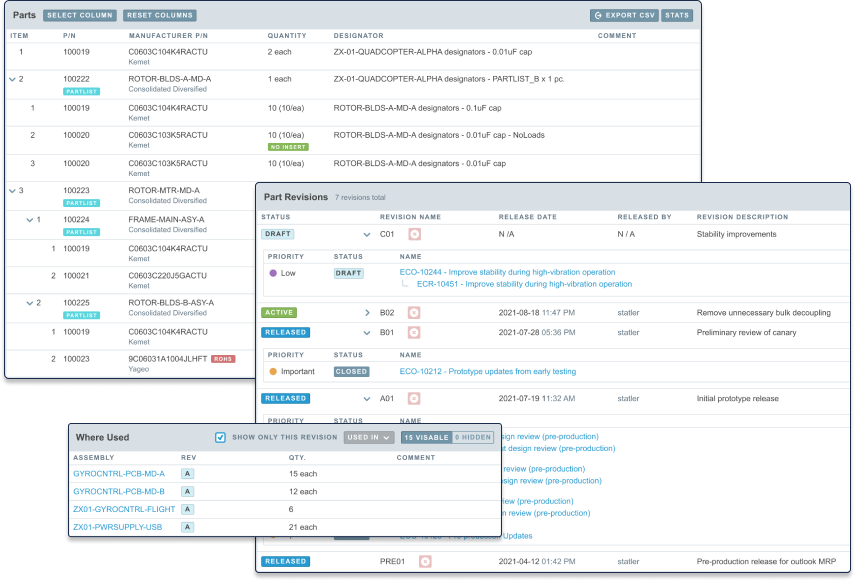
BOM and revision management, the engineering backbone

Aligni BOM and revision management view
FIG. 02 BOM view. Multi-level assemblies with revision control, integrated change iterations, and where-used visibility for every component.
Strength

Where-used works in both directions. Navigating from a part up to every assembly that uses it is the query that makes change management safe, and it's first-class here.

Friction risk

Table density is the genre's tax. Deep BOMs mean wide, dense grids; without strong progressive disclosure (collapsing levels, column presets), new users face a wall of rows.

Open question

Documentation across BOM levels is an active development area in Aligni's own release notes, a signal that deep-assembly navigation is where users struggle.

Inventory Outlook, the signature visualization

Aligni material planning with demand estimates and shortage report
FIG. 03 Material planning. Demand estimates and the shortage report feeding the forecast timeline.
Strength

Explainable forecasting. Every data point traces to a cause: a build, a PO, a threshold. This is the anti-black-box move, and planners can defend a buy decision by pointing at the chart.

Drop-dead order dates convert a forecast into an action. Not just "you'll run out" but "order by this date." The visualization ends in a verb.

TimeWarp separates simulation from truth. What-if scenarios run without touching live data, the safety rail that makes exploration psychologically free.

Friction risk

Color-coded charts carry a learning curve. Which color is demand versus inbound versus safety stock has to be learned, and accessibility depends on redundant cues (shape, labels, tooltips) being consistently present.

Safety stock and logistics, the everyday grind made auditable

Aligni multi-warehouse safety stock settings
FIG. 04 Safety stock per warehouse. Thresholds driven by usage, demand trends and lead times, visualized directly in the forecast.
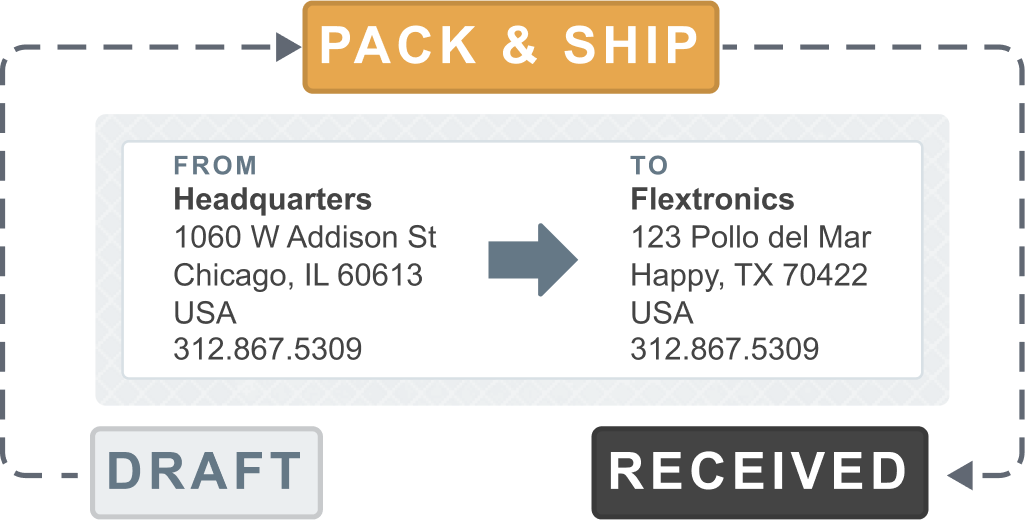
Aligni material transfer between warehouses
FIG. 05 Transfers and adjustments. Corrections, cycle counts and rebalancing, bulk-capable and fully logged against the item master.
Strength

Audit-readiness as a default, not a compliance add-on. Every adjustment and transfer carries history, and trust in the numbers is what keeps teams off shadow spreadsheets.

Warehouse zones, VMI and non-nettable locations show respect for messy reality. Quarantined parts under review and consignment stock are modeled, not bolted on.

Open question

Bulk operations UX (updating stock across SKUs, sites and locations at scale) is promised in copy; the safeguards around it, previews, undo, dry-runs, would decide how confident it feels in practice.

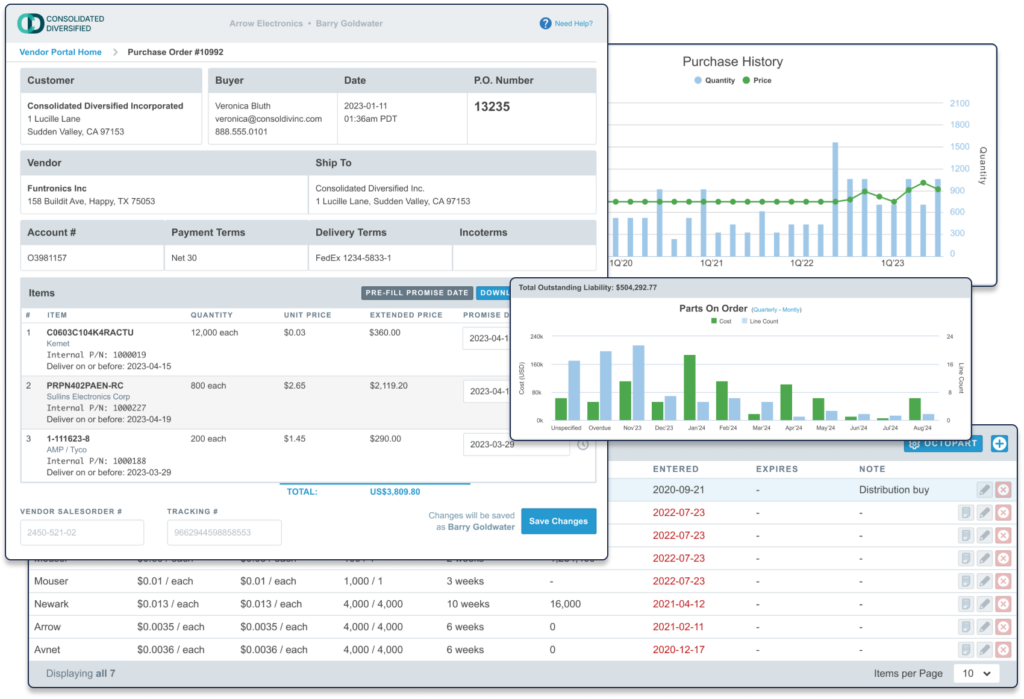
Procurement, buying directly from the shortage

Aligni procurement view with RFQs and purchase orders
FIG. 06 Procurement. RFQs and POs issued from within Aligni, tied to parts and vendors, with responses tracked in-system.
Strength

The shortage is the shopping list. Buyers purchase directly from BOMs and the Material Shortage Report, so the report that identifies the problem is the surface that solves it. No re-keying between knowing and doing.

History compounds into leverage. Every quote and purchase accrues to the item, so pricing trends and vendor performance become negotiating data with zero extra effort.

Parts on order feed the forecast. Inbound POs appear as events in the Inventory Outlook, closing the plan, buy, plan loop.

Friction risk

Vendor-facing surfaces are the exposed edge. Suppliers can adjust information in the system, a strong collaboration move that also imports an external user population with zero training, raising the bar for that flow's clarity.

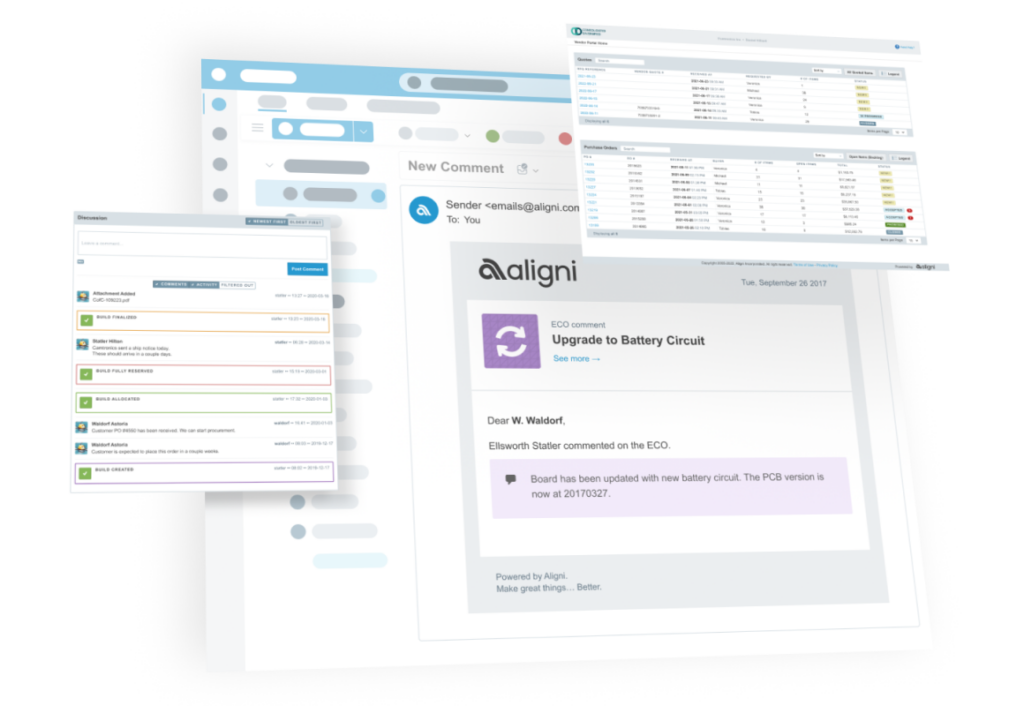
DiscussAnything, the context layer

Aligni in-context discussion threads on records
FIG. 07 Threads pinned to records. Searchable discussions live on parts, builds, transfers, POs, RFQs and equipment, so decision context stays with the object it concerns.
Aligni automated report subscriptions
FIG. 08 Subscribed reports. Inventory and usage reports arrive by email on a chosen schedule, with configurable format, sorting and scope.
Strength

An institutional-memory feature disguised as chat. Sharing knowledge on record, without relying on email, is aimed squarely at turnover and tribal knowledge, the silent killers in SMB operations.

Push beats pull for oversight roles. Owners and ops leads get the state of the operation without logging in, a pragmatic nod to how SMB stakeholders actually consume data.

Open question

Notification design decides adoption. In-record threads only beat email if people reliably see replies without living in the app, and the digest layer is the make-or-break detail not visible from outside.

07 · What holds it together

Shared truth, screens that end in a verb.

01

One record, many lenses

The item master anchors every module. Roles don't get separate systems, they get purpose-built views of shared truth, which is what makes cross-team trust possible.

02

Screens that end in an action

Aligni's best surfaces end in a verb: the forecast yields order dates, the shortage report yields POs. Insight and execution share a screen, so nothing is re-keyed.

03

Traceability as trust currency

Logged adjustments, revision history, quote archives, on-record discussions. In operations software the audit trail isn't compliance décor, it's the reason people stop keeping shadow spreadsheets.

04

The evaluation designed like the product

Public sandbox, published pricing, free onboarding, in-app training. The evaluation experience is designed with the same intent as the product, rare in this category and a real conversion asset.

08 · Risks & opportunities

Where fit-to-scale gets tested.

01

Density is the genre's gravity

MRP is tables all the way down: parts, lines, lots, POs. The risk is that first-run users hit density before they hit value. The counterweights (QuickSearch, the visual Outlook, in-app training) matter; an opinionated first-week path per role would matter more.

02

Concept load precedes the tool

Safety stock, nettable locations, ECOs, demand horizons. Much of the learning curve is MRP itself, not Aligni. Folding that education into the UI, with explain-this-number affordances on the forecast, is the natural next step, and the tooltip-rich Outlook chart suggests the instinct is already there.

03

Trademarked features must stay discoverable

TimeWarp, DiscussAnything, QuickSearch. Branded names give marketing hooks, but inside the product they must remain findable by what they do (simulate, comment, search) or the branding taxes usability.

04

The supplier edge is an opportunity

Vendor collaboration is already in the model; deepening that portal with quote entry, delivery confirmations and document exchange turns Aligni from an internal tool into the connective tissue of a small supply chain, sticky in the best way.

09 · Takeaways

Four principles worth stealing.

01

Right-sizing is a strategy, not a compromise

Aligni doesn't apologize for not being ERP. It argues the smaller scope is the correct scope for its customer, and prices, onboards and designs accordingly. Clarity about who you're not for is a UX position.

02

Make the model explainable and users will trust the numbers

The Inventory Outlook's traceable, hoverable data points are the difference between a forecast people follow and a forecast people re-derive in Excel.

03

Put the conversation on the record

Attaching discussion to objects instead of inboxes converts communication into institutional memory, a compounding asset for teams with turnover.

04

Design the evaluation like it's the product

The public demo sandbox, published pricing and free onboarding treat the buying journey as a UX surface. For considered B2B purchases, that journey is where trust is actually won.

Aligni is a case study in fit-to-scale UX: don't out-suite the ERPs, out-fit them, and let every screen prove the operation is visible, explainable and one click from action.

Method note: the live demo environment disallows automated access, so all screenshots are Aligni's own published product captures. Friction risks and open questions are analytical inferences a hands-on session would be needed to confirm. Screens © Aligni Incorporated.

Next case study

Make a course catalog feel like a path